

Modern AAA games and heavily modded eSports titles frequently require between 50GB and 250GB of installation space per title. Upgrading from old hard drives (HDDs) to Non-Volatile Memory Express (NVMe) solid-state drives (SSDs) yields quicker load times, smooth streaming of in-game assets, and the high throughput demanded by technologies like DirectStorage (DLS). Modern storage configurations prevent system bottlenecking, stuttering during open-world asset streaming, and frequent file deletions.
Why Does Choosing the Right Gaming PC Storage Matter?
Choosing the right gaming PC storage determines system responsiveness, game loading speeds, background stability, and long-term hardware health. Modern AAA games rely on rapid drive-to-GPU data pipelines. Insufficient or slow storage causes severe in-game micro-stuttering, late texture pop-in, extended loading screens, and unexpected application crashes when drive volumes fill to maximum capacity.
When a storage drive reaches peak utilization, the operating system struggles to execute routine background write requests, such as shader compilation, patch updates, and virtual memory paging. Selecting a storage setup with adequate capacity and high input/output operations per second (IOPS) prevents hardware bottlenecks, maintains stable frame rates, and ensures smooth multitasking when running background applications like voice chat, streaming, software, or web browsers alongside games.
How Much Storage Does Your Gaming PC Needs?
The amount of storage required for a gaming PC depends upon your gaming habits and installation count. Check the table below for insights.
| Gaming Habit | Recommended Storage | Storage Type | Game Type |
|---|---|---|---|
| Casual Gaming | 500GB – 1TB SSD | SSD (SATA or NVMe) | 2 to 4 modern titles or light indie games |
| Mainstream Gamer | 1TB – 2TB SSD | NVMe SSD | 8 to 12 AAA titles, patch files, and gaming routines |
| AAA Gamer and Streamer | 2TB+ SSD + HDD | NVMe SSD + HDD Combo | Large competitive libraries, heavy mods, fast loading |
| Competitive eSports | 1TB NVMe SSD | High-speed NVMe SSD | Fast load times for online multiplayer games |
| Content Creator + Gamer | 2TB+ NVMe SSD + HDD | NVMe SSD for OS + HDD for files | 4K video editing, local game recording, backups |
- Casual Gamers (500GB – 1TB): A 500GB to 1TB drive setup provides enough space for the operating system, daily software applications, and a small rotational library of 2 to 4 modern titles alongside lightweight indie releases.
- Mainstream Gamers (1TB – 2TB): A 1TB to 2TB drive serves as the ideal setup for users who maintain a diverse collection of 8 to 12 active games, allowing space for large game patches, seasonal updates, and multi-gigabyte DLC expansion packs.
- Hardcore & eSports Gamers (2TB): A dedicated 2TB high-speed NVMe drive supports massive competitive libraries, extensive community modifications, high-resolution texture packs, and fast map loading required to maintain a competitive edge.
- Content Creators & Streamers (2TB + 4TB): A multi-drive combination utilizing a high-speed 2TB NVMe SSD for system binaries and active games alongside a high-capacity 4TB secondary drive secures sufficient headroom for raw 4K video recordings, render caches, and long-term project archives.
Why Is a 2TB SSD Storage Capacity Ideal for Desktop PC Gamers?
A 2TB NVMe SSD offers the optimal balance of value, long-term stability, and available storage space for desktop PC gamers. Modern operating systems consume approximately 40GB of baseline storage, while current AAA releases regularly cross 100GB to 150GB per installation. A 2TB drive provides enough usable volume to install 10 to 15 large AAA titles alongside daily applications, video clips, and ongoing game updates without forcing users to uninstall games constantly.
From an architectural perspective, 2TB SSDs often feature higher Terabytes Written (TBW) endurance ratings and larger DRAM caches compared to lower-capacity models of the same drive line. This increased physical endurance extends the lifespan of the flash memory cells under continuous read and write operations, making 2TB drives the most future-proof investment for a modern gaming rig.
What Are Different Types of Storage Solutions for Gaming?
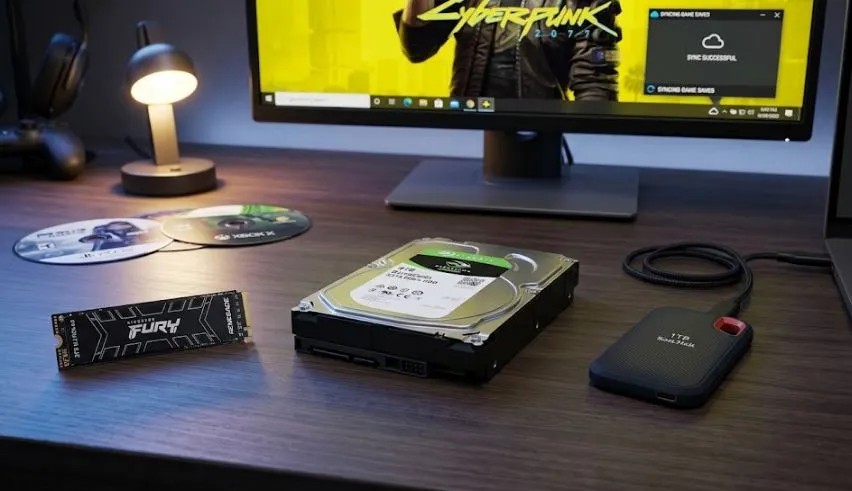
The main types of storage solutions for gaming are mentioned below:
- Hard Disk Drive (HDD): Hard disk drives are mechanical storage devices that offer high storage capacity at a low price-per-gigabyte. While HDDs provide a cost-effective solution for archiving bulk files and older games, their physical moving parts degrade over time and slow down game loading speeds compared to SSDs.
- NVMe SSD: Non-Volatile Memory Express (NVMe) solid-state drives are non-mechanical storage devices that connect directly to the motherboard via PCIe lanes. They offer maximum data transfer speeds, significantly reduce game loading times, and eliminate in-game texture pop-in.
- External Storage: External SSDs or HDDs connect to a computer using a USB interface to expand storage capacity. These portable drives provide flexible space expansion for portable game libraries, though USB bandwidth limits transfer speeds compared to internal drives.
- Cloud Storage: Cloud storage is an online server service used to back up game save data, system configurations, and user profiles over an internet connection. While cloud storage cannot run or install local game files directly, it frees up local drive space and synchronizes game progress across multiple devices.
How Does Storage Affects Game Load Times?
Storage speed directly determines game load times by dictating how fast compressed textures, level geometry, and sound banks transfer into your system memory (RAM and VRAM).
- Mechanical HDDs (~100–150 MB/s): High seek latency and physical platter limits result in long load screens lasting anywhere from 45 seconds to several minutes.
- SATA SSDs (~550 MB/s): Significantly cut loading times down to roughly 10–20 seconds.
- NVMe PCIe SSDs (3,500–7,400+ MB/s): Paired with modern APIs like Microsoft DirectStorage, NVMe SSDs reduce loading screens to just 1 to 3 seconds by streaming assets directly to the GPU.
How Does Storage Affect Asset Streaming In Open-World Games?
In open-world games, environments are rendered dynamically on the fly as you move through the world. Fast NVMe SSDs deliver high random read speeds (IOPS), allowing the engine to seamlessly stream high-resolution textures, 3D models, and NPC data directly into VRAM without delay. Slow storage (like a traditional HDD or an overloaded SSD) creates data bottlenecks, causing severe micro-stuttering, frame drops, and visible texture “pop-in” where objects or detailed graphics abruptly appear out of nowhere.
Why Are SSDs the Top Choice for Professional Gamers?
Solid-state drives deliver near-instantaneous file access times, high random IOPS (Input/Output Operations Per Second), and bandwidth ratings that hard disk drives cannot replicate. Professional gaming demands absolute consistency in frame times and zero latency spikes during fast-paced competitive matches.
Traditional mechanical hard drives introduce variable seek times due to the physical movement of the mechanical read/write arm across spinning magnetic platters. SSDs remove mechanical components entirely, allowing the storage controller to pull game data from flash memory cells concurrently. This structural advantage guarantees rapid map load times, smooth asset rendering, and stable frame rates under heavy system load.
What Are the Key Benefits of PCIe Gen 3, Gen 4, and Gen 5 SSDs in Gaming?
PCIe generations define the theoretical bandwidth ceiling and transfer rates of NVMe SSDs. While sequential read and write speeds scale exponentially between generations, real-world gaming performance variations depend on specific engine optimization and DirectStorage implementation.
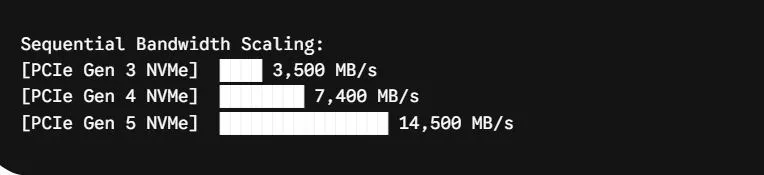
- PCIe Gen 3 SSDs (~3,500 MB/s): Delivers fast baseline load times for entry-level and budget gaming builds. While significantly faster than legacy SATA SSDs, Gen 3 drives hit sequential bandwidth limits in modern games that utilize advanced DirectStorage APIs or real-time 4K asset streaming.
- PCIe Gen 4 SSDs (~7,400 MB/s): Serves as the current sweet spot for price-to-performance in modern gaming PCs. Gen 4 drives double the throughput of Gen 3, fully support DirectStorage asset streaming pipelines, operate efficiently under standard passive motherboard heat sinks, and eliminate loading bottlenecks across current AAA titles.
- PCIe Gen 5 SSDs (~14,500 MB/s): Represents the top speed tier for cutting-edge hardware enthusiasts. Although sequential transfer rates double compared to Gen 4, real-world game load times improve by less than 1 to 2 seconds in standard games. Gen 5 drives generate significant thermal output, requiring dedicated active cooling heat sinks or fans, making them optimal for intensive 4K video editing workflows rather than pure gaming builds.
Can Improper Storage Management Hurt System Performance?
Yes, running a primary system drive near maximum capacity harms real-time performance, system responsiveness, and underlying drive health. Solid-state drives rely on flash controllers to perform wear leveling, garbage collection, and TRIM commands, which manage electrical charges across NAND flash blocks. When an SSD exceeds 85% to 90% of its total storage capacity, the internal controller runs out of clean, block-level space to perform these background maintenance operations efficiently.
As available block space decreases, the SSD controller experiences write amplification, forcing it to read, erase, and rewrite existing data blocks continuously during simple file updates. This behavior increases input latency, causes frame drops during active gameplay, reduces sustained write speeds, and accelerates physical drive wear over time. Furthermore, installing modern games on mechanical hard drives causes severe texture pop-in and thermal throttles systems that wait on slow IOPS operations.
What Are Practical Tips for Managing Game Libraries?
Follow the tips below to properly maintain your gaming library for better gaming peformance:
- Maintain Free Space Overhead: Reserve at least 10% to 15% of total SSD capacity as unallocated space to preserve controller efficiency, maintain TRIM execution, and keep sustained write speeds optimal.
- Implement a Tiered Storage Setup: Install active, high-performance AAA titles and your primary operating system on a fast NVMe SSD, while offloading completed single-player games, indie titles, and media archives to secondary SATA SSDs or HDDs.
- Clean Patch and Cache Files: Utilize built-in disk cleanup tools or vendor management software to delete temporary installation packages, obsolete shader caches, leftover update files, and unneeded game mods regularly.
- Monitor Drive Health Metrics: Use SMART monitoring software to track drive temperatures, total bytes written (TBW), and remaining endurance life to replace aging hardware before catastrophic drive failure occurs.
How Much Space Do Advance Games Require?
Modern advanced AAA games require between 50GB and 250GB of installation space per title. High-fidelity releases like Call of Duty or Baldur’s Gate 3 frequently exceed 100GB to 150GB, driven by high-resolution 4K textures, uncompressed spatial audio, and expansive open-world environments.
How I Can Free Up Space on My Gaming PC?
To free up space on a gaming PC, uninstall unused games through your digital storefronts (like Steam, Epic Games, or Xbox App) and clear temporary shader caches and system update files using Windows Disk Cleanup. You can also transfer static media, local recordings, and completed titles to a secondary drive, or utilize cloud storage to back up save files before deleting local copies.
Can I Use Cloud Storage for Gaming?
Yes, you can cloud storage in gming but only for saving game progress, settings, and player profiles—not for running or installing local game files. Cloud storage syncs save files across different devices, freeing up local drive space and protecting your data from hardware failures. However, local drives (like NVMe SSDs) are strictly required to run actual game binaries, textures, and assets due to the low-latency bandwidth needed by modern game engines.